Washoe: From Visual Mockup to Styled Page
Brief
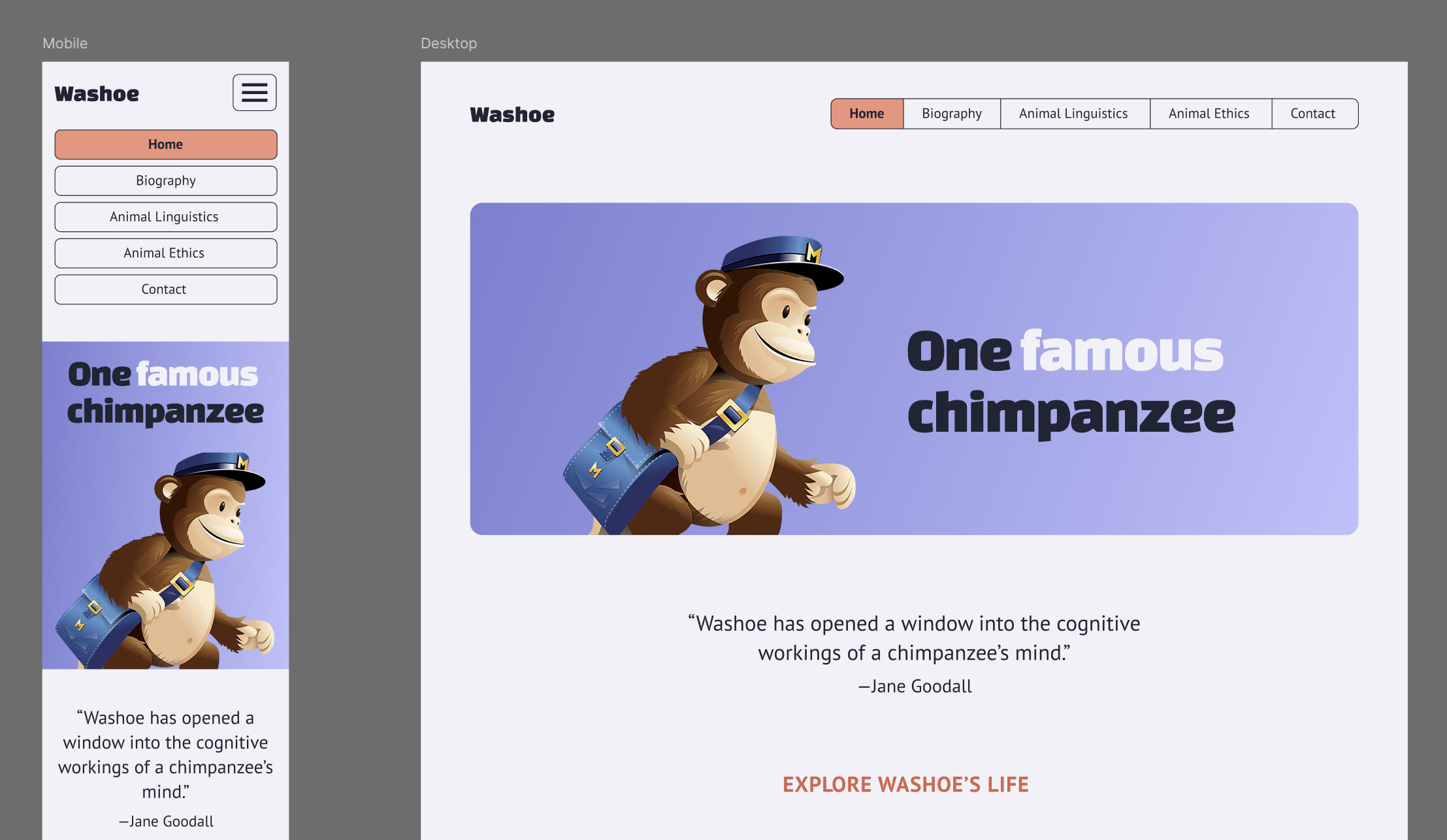
Code the HTML and CSS for the design given. Implement the design as closely as possible.
You must use the VS Code editor.
Learning Goals
The main point for this (purposefully not all that creative) project is for us to thoroughly review the best practices for coding HTML and CSS. Along the way, you will:
- Use Figma
- Get familiar with the VS Code editor
- Learn HTML/CSS best practices
- Write semantic HTML
- Code a responsive and mobile-first page from scratch
- Use browser’s dev tools (aka inspector)
- Validate code
- Employ a CSS reset
- Use webfonts
- Use CSS Variables
- Learn about
flexboxandgrid - Use SVG images
- Code a mobile menu using javascript
Assets
You can access the design using this Figma link.
Also, download these files as a starting point.
The fonts used in the design are PT Sans and Changa One. All three are available on Google fonts. Implementing them is pretty easy.
Important Note
Every student starts this class with a different skill level.
This assignment might be a breeze for you (great!) or it might be daunting (that’s fine!). For now, just do your absolute best to code at least something until next class.
Start as soon as possible! (Starting next Monday night pretty much guarantees disaster.)
I will spend a lot of time in the next weeks walking you through the entire process. By the end of this project, you should be all caught up.
CSS Properties
You will need to utilize (and understand) the following CSS properties. Look them up if you are unfamiliar with any.
displaymarginpaddinggapborderwidthheightmax-widthcolorbackgroundborder-radiusbox-shadowtext-aligntext-transformtext-decorationfont-familyfont-sizefont-weightline-heightletter-spacingmix-blend-modepositiontopright